Dobby: Enterprise AI Knowledge Agent

Private, cited answers on-prem. No code. Governed publishing. First sourced answer in under 10 minutes.

Private, cited answers on-prem. No code. Governed publishing. First sourced answer in under 10 minutes.

Private, cited answers on-prem. No code. Governed publishing. First sourced answer in under 10 minutes.

TL;DR

TL;DR

I led end-to-end design for an on-prem AI knowledge agent. Non-technical owners stalled at setup, so I made presets the default and moved approvals into a focused lane with audit and rollback. Targets: ≥60% no-code build, ≥70% publish in 30 days, <10 minutes to first cited answer.

Intro

Intro

Dobby, a startup building an on-prem enterprise AI knowledge platform. With a small crew and paid users queued up, we target to ship fast using AI building AI. To deliver a no-code, preset-first experience with cited answers and collaboration feature.

Industry

B2B SaaS
B2B SaaS

Timeline

2025 Jun - Now
2025 Jun - Now

Team Size

1 Product Designer • 1 Product Manager • 3 Developers

Responsibility

End-to-end design
End-to-end design

Problem

Enterprise teams want to bring AI into their workflow, but non-technical admins hit a wall during setup due to technical language, limited IT support, and fear of breaking things. They also need an on-prem solution to keep sensitive documents secure, while still getting fast, trustworthy answers from internal files.

Enterprise teams want to bring AI into their workflow, but non-technical admins hit a wall during setup due to technical language, limited IT support, and fear of breaking things. They also need an on-prem solution to keep sensitive documents secure, while still getting fast, trustworthy answers from internal files.

Enterprise teams want to bring AI into their workflow, but non-technical admins hit a wall during setup due to technical language, limited IT support, and fear of breaking things. They also need an on-prem solution to keep sensitive documents secure, while still getting fast, trustworthy answers from internal files.

So…how do we make enterprise AI adoption trustworthy, auditable, and secure?

So…how do we make enterprise AI adoption trustworthy, auditable, and secure?

Design Process

1

Discover

I learn what’s really happening by talking to users, reviewing data, and scanning the market for patterns and gaps.

Short interviews and competitor analysis revealed two blockers: users either had to wait too long dig through files at company to find the answer they need, or the tool wasn't approachable if they didn't know how to code.

Short interviews and competitor analysis revealed two blockers: users either had to wait too long dig through files at company to find the answer they need, or the tool wasn't approachable if they didn't know how to code.

2

Define

I turn messy input into a clear problem, a few sharp insights, and a focused goal we can align on.

affinity map

problem defining

journey map

3

Develop

I explore solution options, map the flows and structure, and design the simplest version that can work.

user flow

design solution

4

Deliver

I validate with users, refine what’s confusing, and package the work so it’s ready to build and iterate.

user testing

hi-fi prototype

Competitive landscape

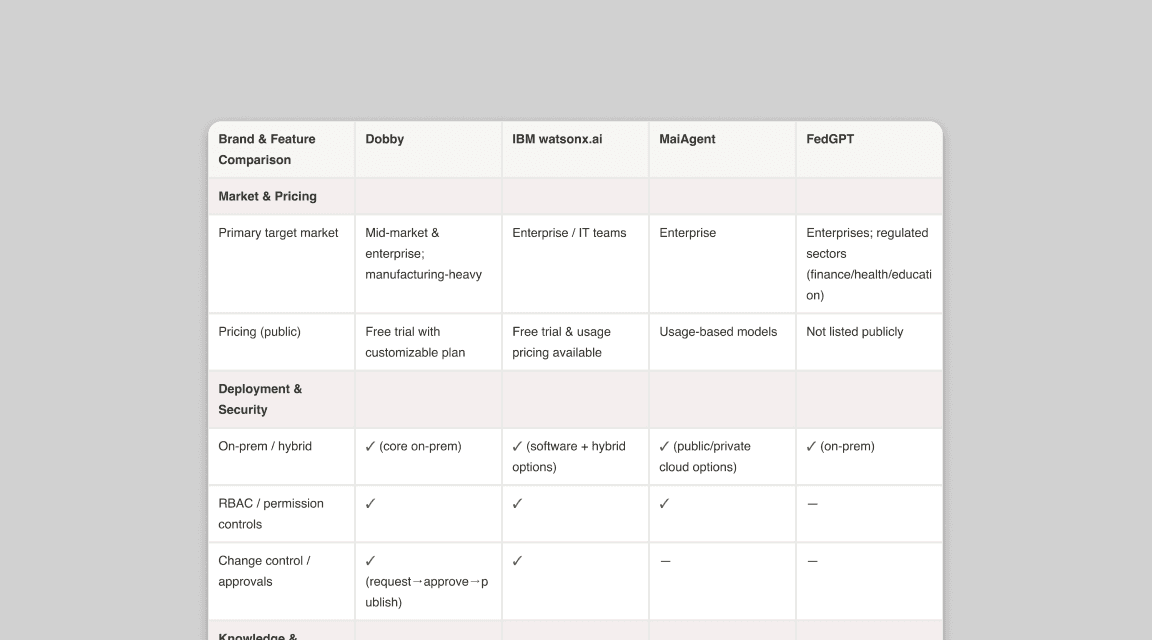
From survey key competitors in market in Taiwan, there is a gap in no-code workflow builder in the market to provide users with limited coding experience to chain actions and approvals more efficiently.

From survey key competitors in market in Taiwan, there is a gap in no-code workflow builder in the market to provide users with limited coding experience to chain actions and approvals more efficiently.

Understanding the users

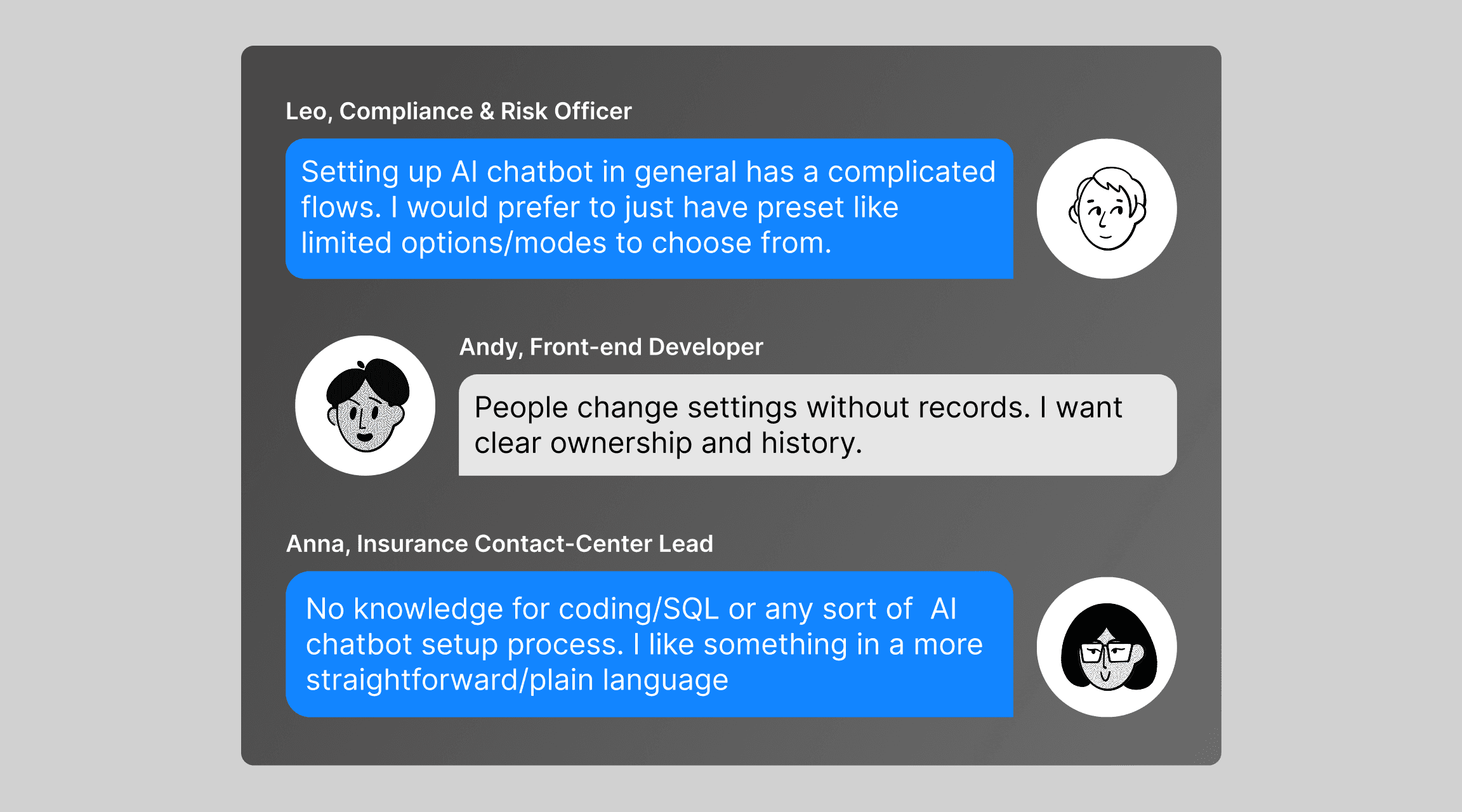
I interviewed 5 participants from our potential customers. We learned that

I interviewed 5 participants from our potential customers. We learned that

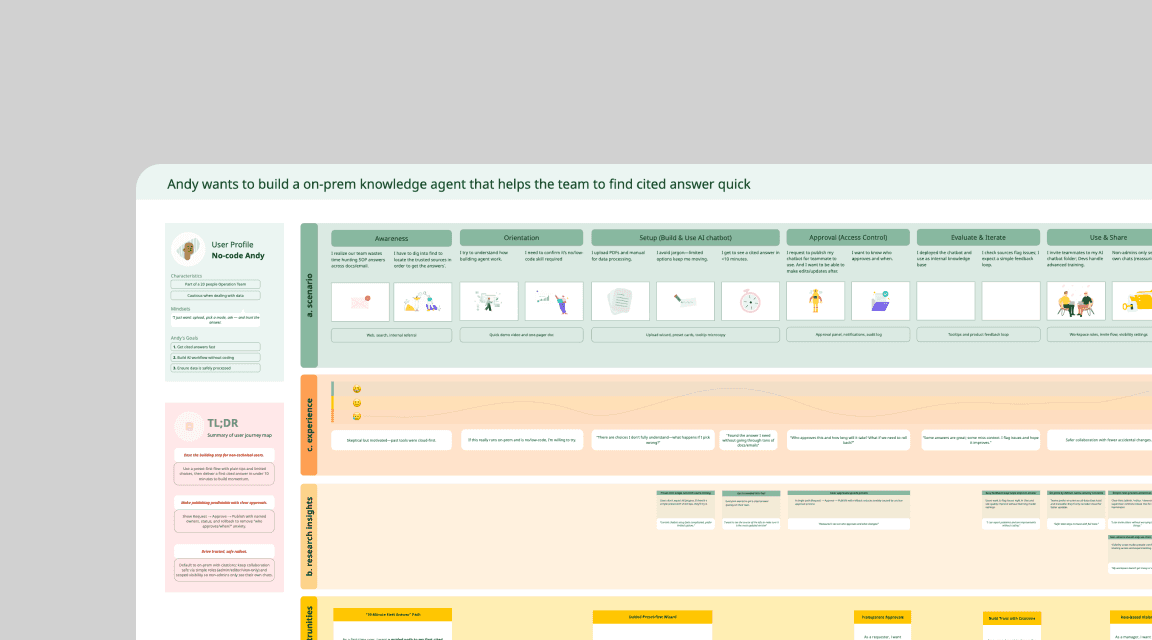
Mapping end to end experience

Learning: ease the building step for non-technical users. Make publishing predictable with clear approvals. Default to on-prem with citations; keep collaboration safe via simple roles (admin/editor/view-only) and scoped visibility so non-admins only see their own chats.

Learning: ease the building step for non-technical users. Make publishing predictable with clear approvals. Default to on-prem with citations; keep collaboration safe via simple roles (admin/editor/view-only) and scoped visibility so non-admins only see their own chats.

Defining key paths

I simplified the build flow with presets For publishing, I added change summaries, diffs, and a sandbox to test before release—all tracked in an audit trail. Role-based access kept it clean: Admins publish, Editors prep, Viewers chat. Inline flagging turned user issues into improvement requests.

I simplified the build flow with presets For publishing, I added change summaries, diffs, and a sandbox to test before release—all tracked in an audit trail. Role-based access kept it clean: Admins publish, Editors prep, Viewers chat. Inline flagging turned user issues into improvement requests.

Solution

Internal tool that surfaces reliability and trust

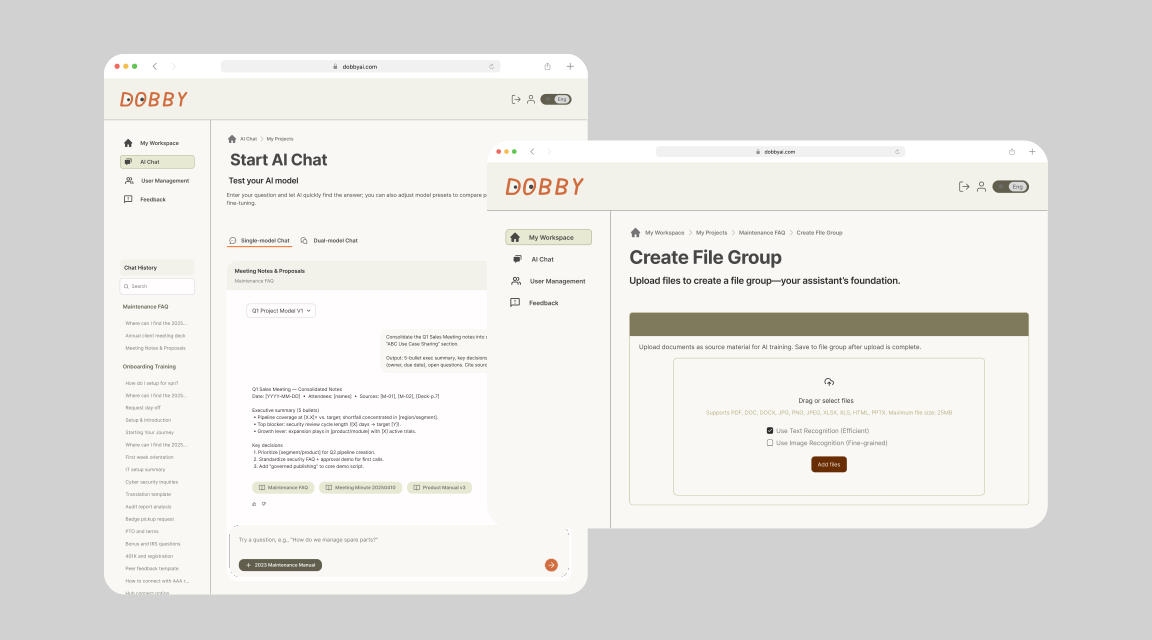
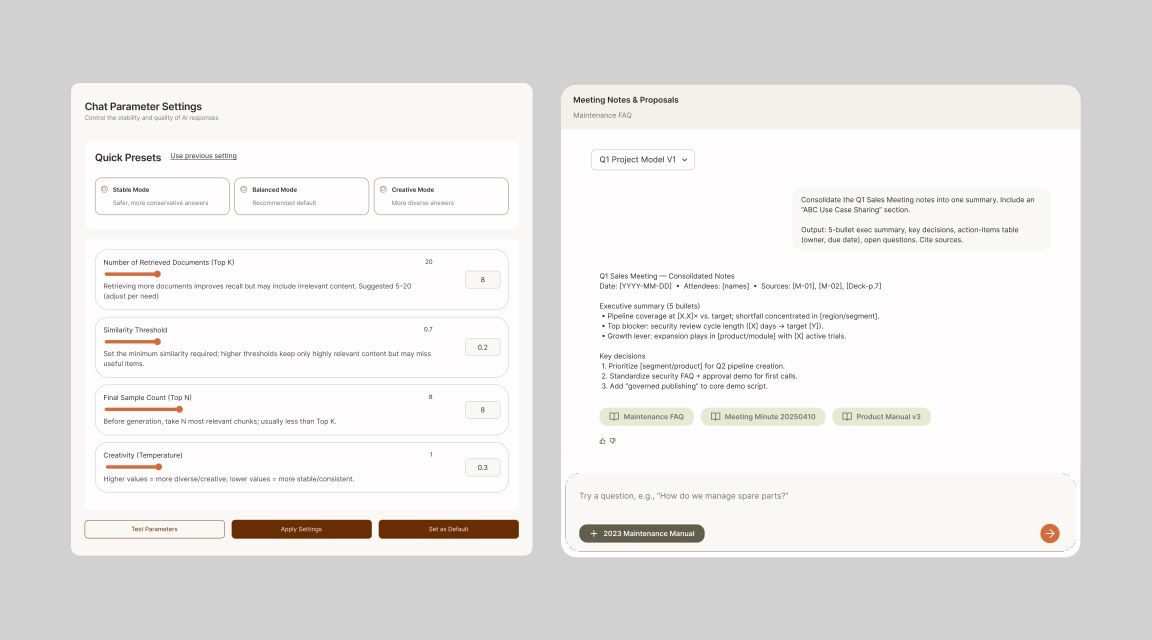
Upload, pick a preset, see ETA, ask, and get a sourced answer on one surface. Users said trust = seeing sources, not just confidence scores.

Upload, pick a preset, see ETA, ask, and get a sourced answer on one surface. Users said trust = seeing sources, not just confidence scores.

Approval you can skim and ship

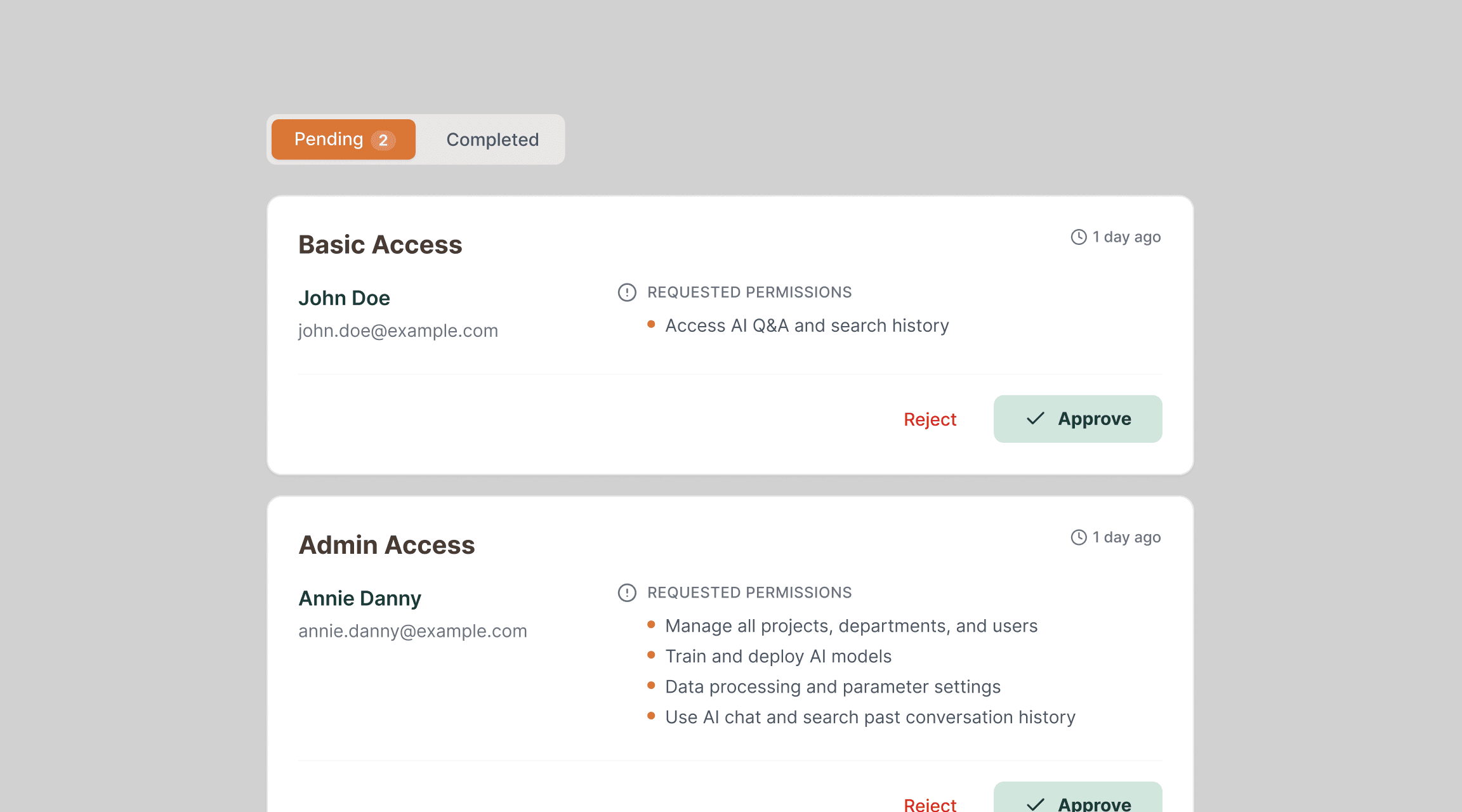
Request → Review → Approve → Publish, with audit and rollback. Clear, reversible steps turn a demo into something leaders are willing to roll out.

Request → Review → Approve → Publish, with audit and rollback. Clear, reversible steps turn a demo into something leaders are willing to roll out.

Roles & scoped visibility

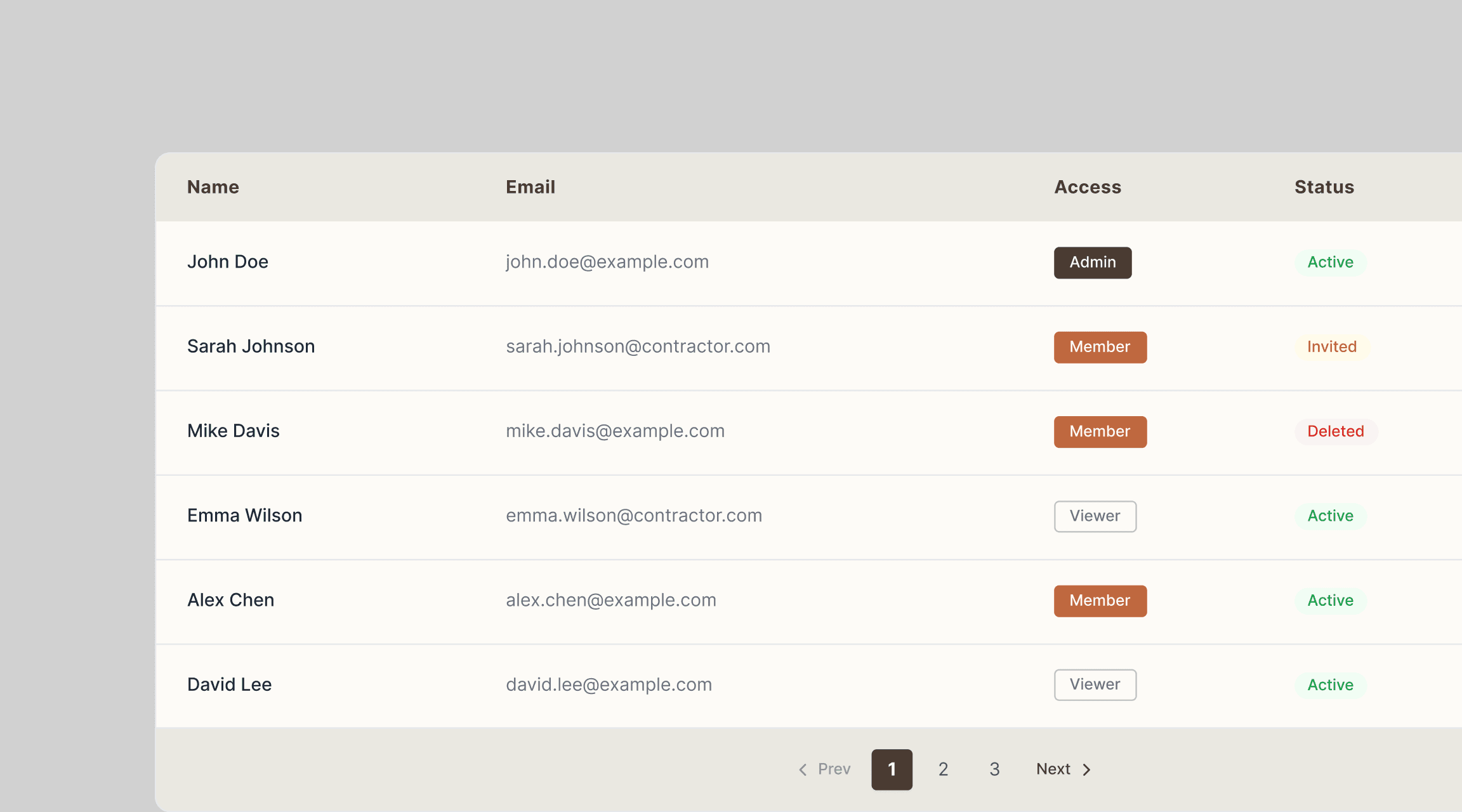
Define Admin, Editor, Viewer, and scope chat visibility to the right people, reducing risk and keeping data private.

Define Admin, Editor, Viewer, and scope chat visibility to the right people, reducing risk and keeping data private.

Design System

I built a modular design system so the team could scale faster on upcoming launches with reusable components.
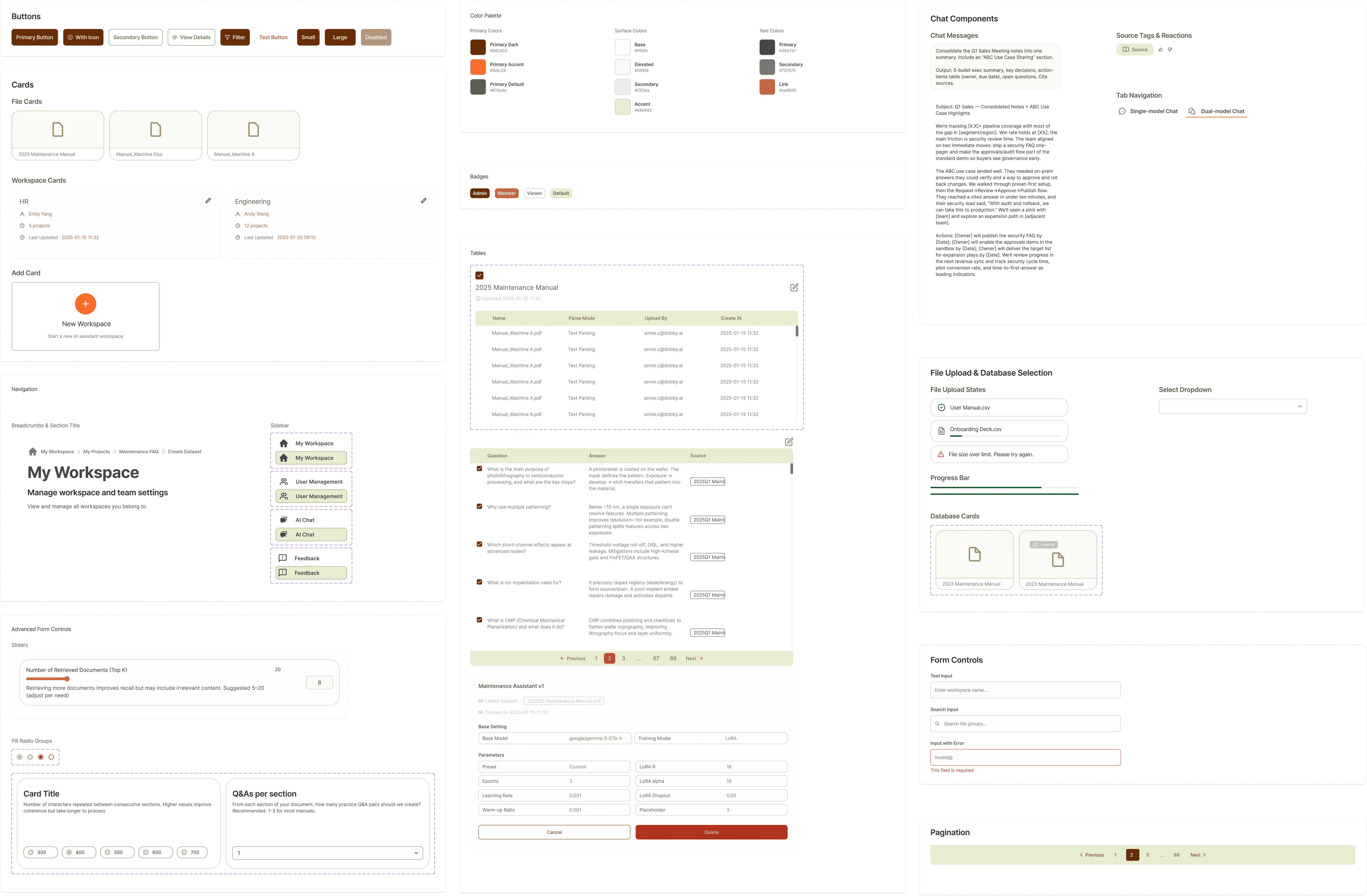
I built a modular design system so the team could scale faster on upcoming launches with reusable components.

User Testing

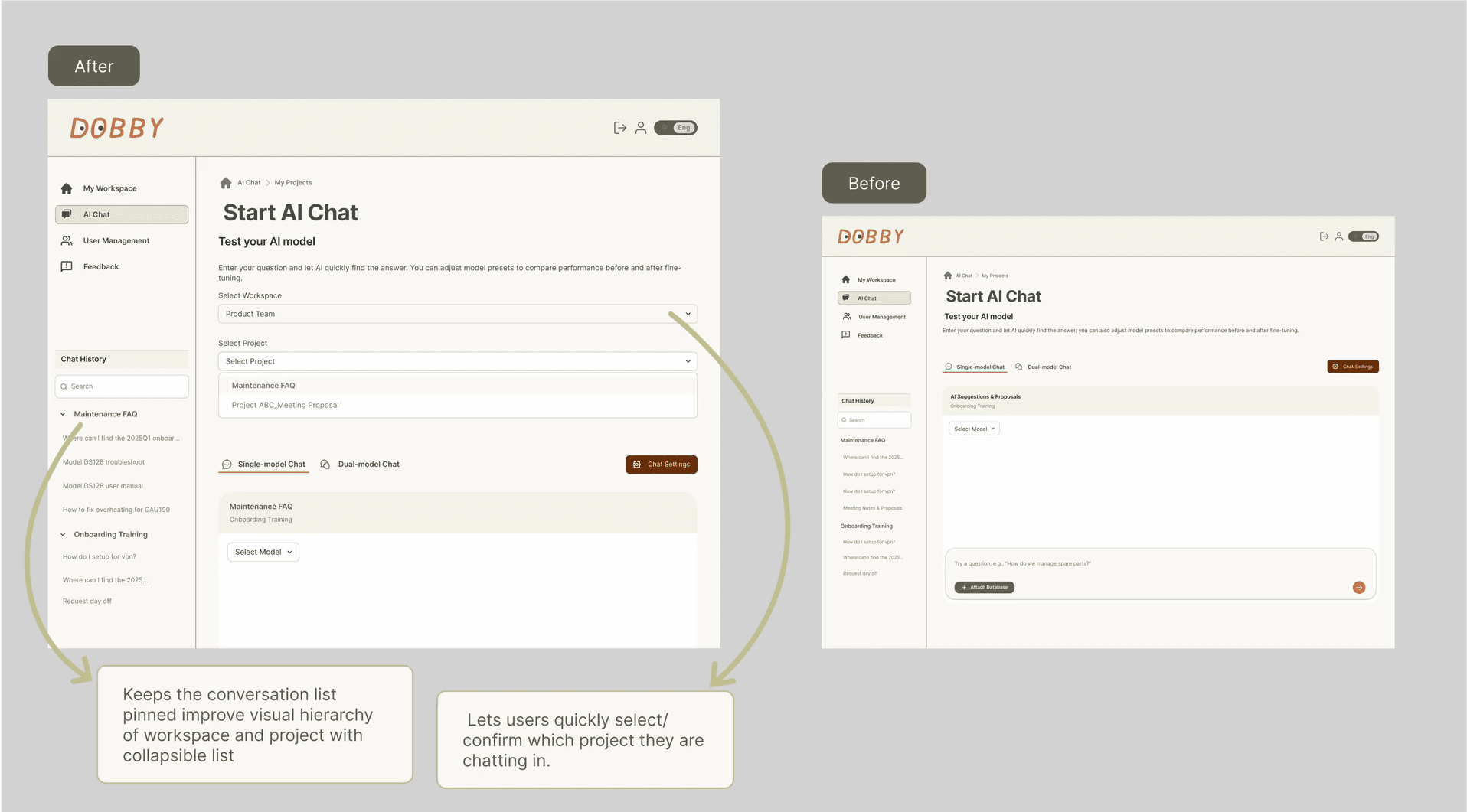
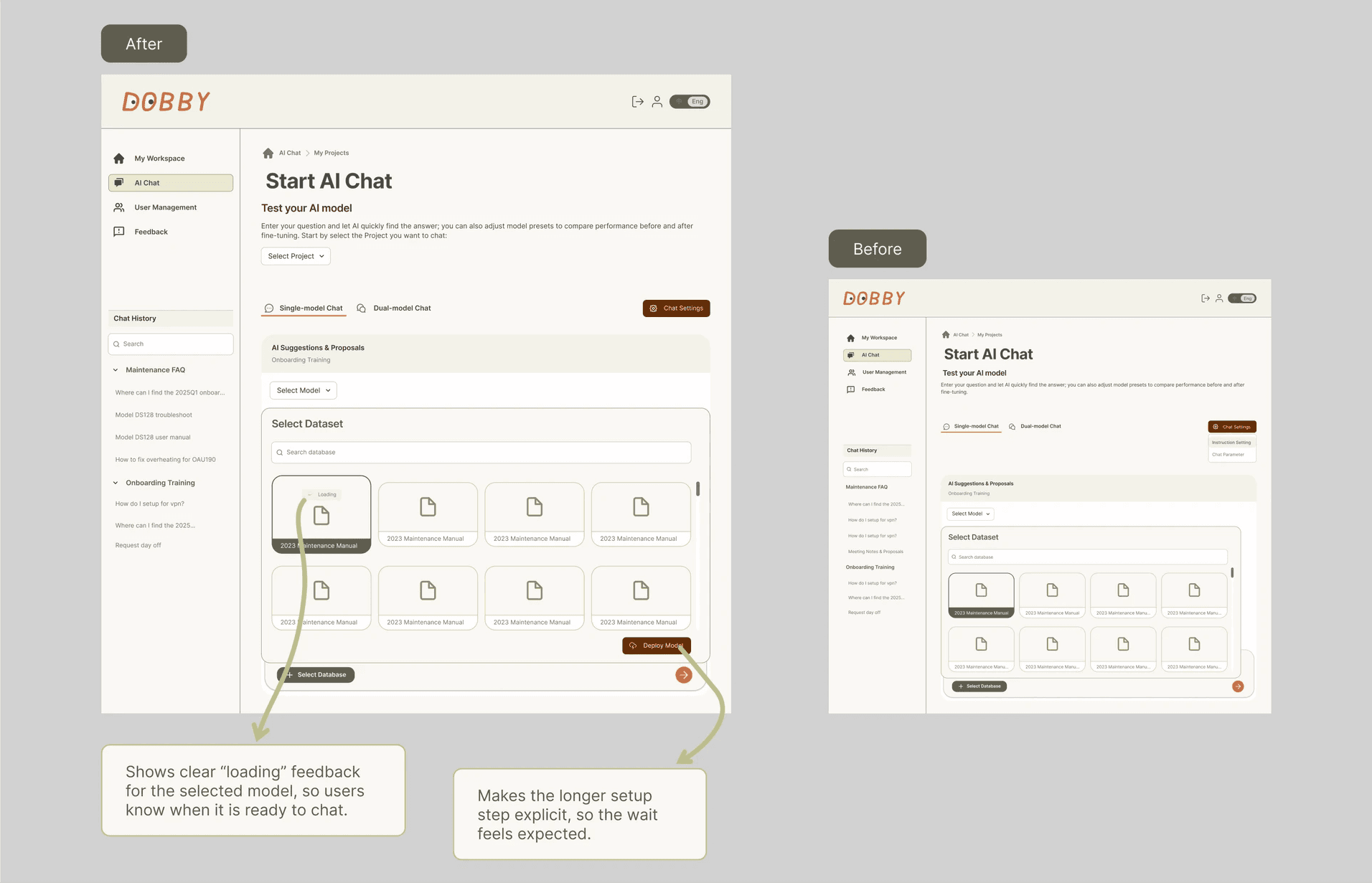
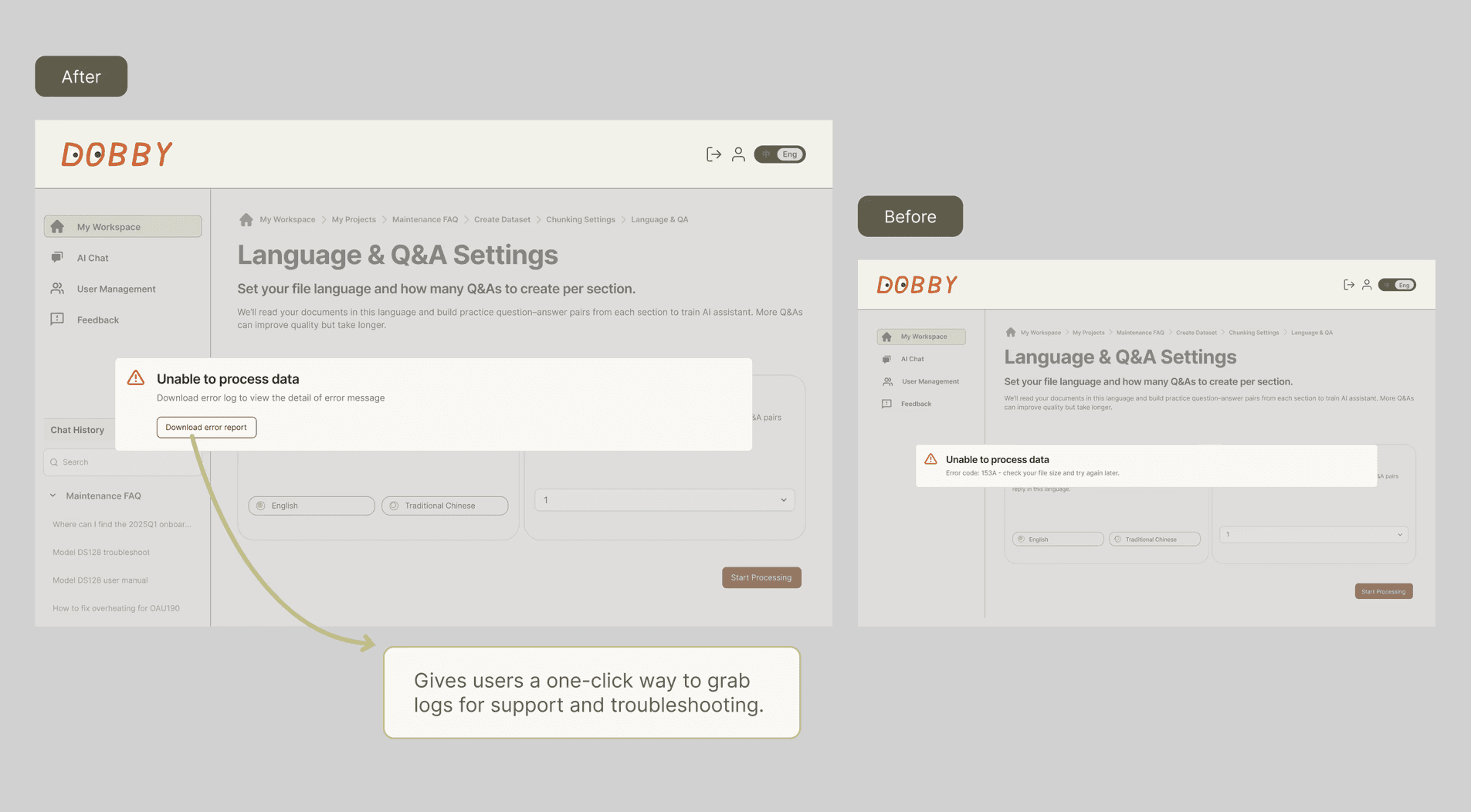
Usability test was tested with 5 users and I iterated the chat experience to reduce “where am I?” confusion and help users move between projects and conversations without getting lost. I also improved system clarity and support by making model readiness obvious during setup and chat, and adding an easy way to export error logs when something fails.

Project Dropdown and Expandable Conversation List

Model Loading State

Error Log Download Button
Target Metrics

No-code build completion

In 2 weeks, ≥60% of first-time, non-technical owners create an assistant and send a first test prompt in a single session.

Time to first cited answer

In 30 days, ≥50% of new workspaces see a source-backed answer in under 10 minutes.

Final Design & Up Next

Launching in Phases

  • Phase 1 launched in December 2025 with a simplified model experience. More advanced enterprise features are planned for release in Q1 2026

  • Partial of the current design reflects the product roadmap and includes capabilities from upcoming releases. Expect UI polish and naming updates as the product evolves.

  • Note: Usability testing was conducted in Traditional Chinese. Full English localization UI will be included in the upcoming rollout plan.

Measuring Targets

While we do not have post-launch quantitative data yet, team's priority upon launch will be validating our design decisions against the target metrics